SKU Manager Beta

Hundreds of listings a day. Let AI and code do the first read.

SKU Manager reviews each listing against your buying criteria, title to photos, and puts the answer next to it in uBuyFirst Desktop. You make the call.

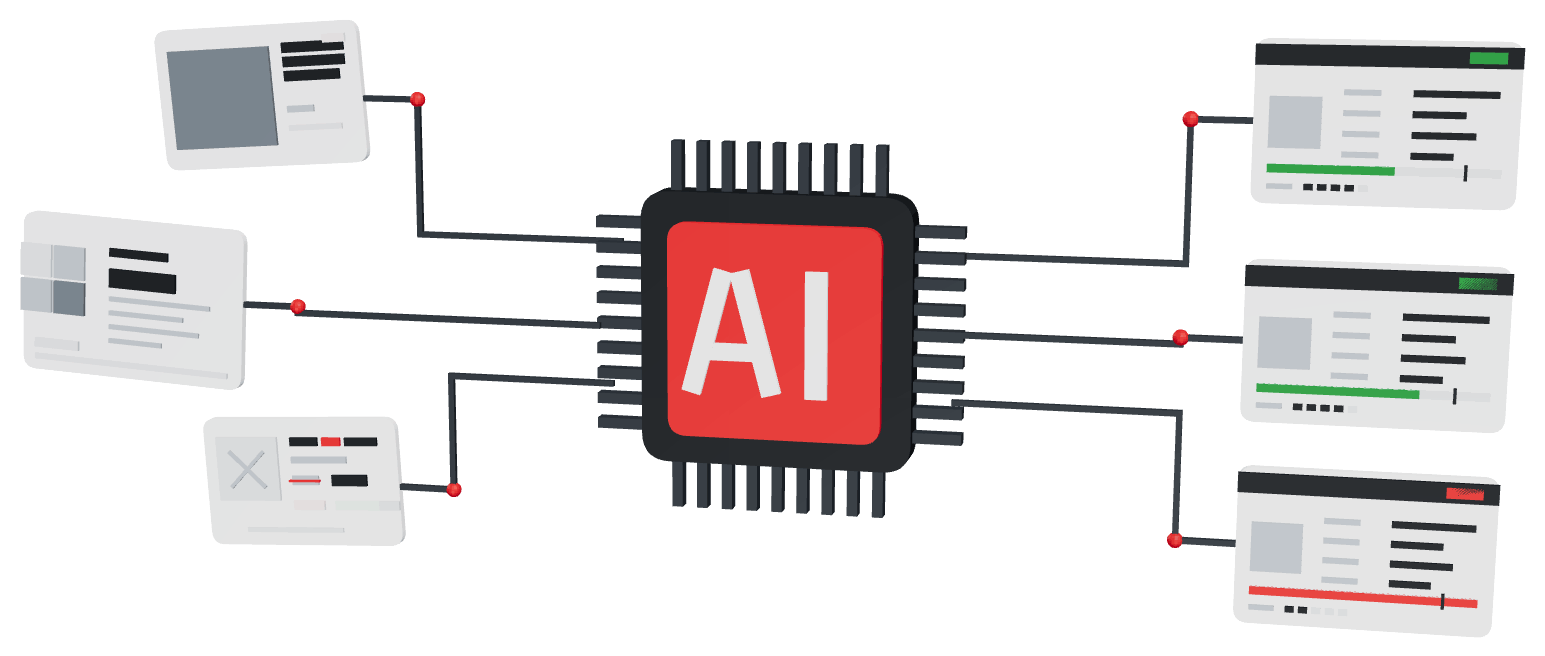
Raw eBay listings flow into an AI chip and come out as structured records
Listings in, checked records out.
The pains

Three things you check on every listing. By hand. All day.

The title, the condition text, the photos. eBay can't filter any of them, so a person reads them, listing after listing, before a business decision is possible. SKU Manager does that review for you and saves your bandwidth for the edge cases and the rest of the business.

"The title says one thing. The photo says another."

A listing whose title says iPhone 14 Pro while the About screen in photo 3 reads iPhone 14 with cracked glass; SKU Manager flags model mismatch and undisclosed damage

It reads the title and the pictures together and flags the mismatch, so the title doesn't win by default.

"'Tested working' means five different things."

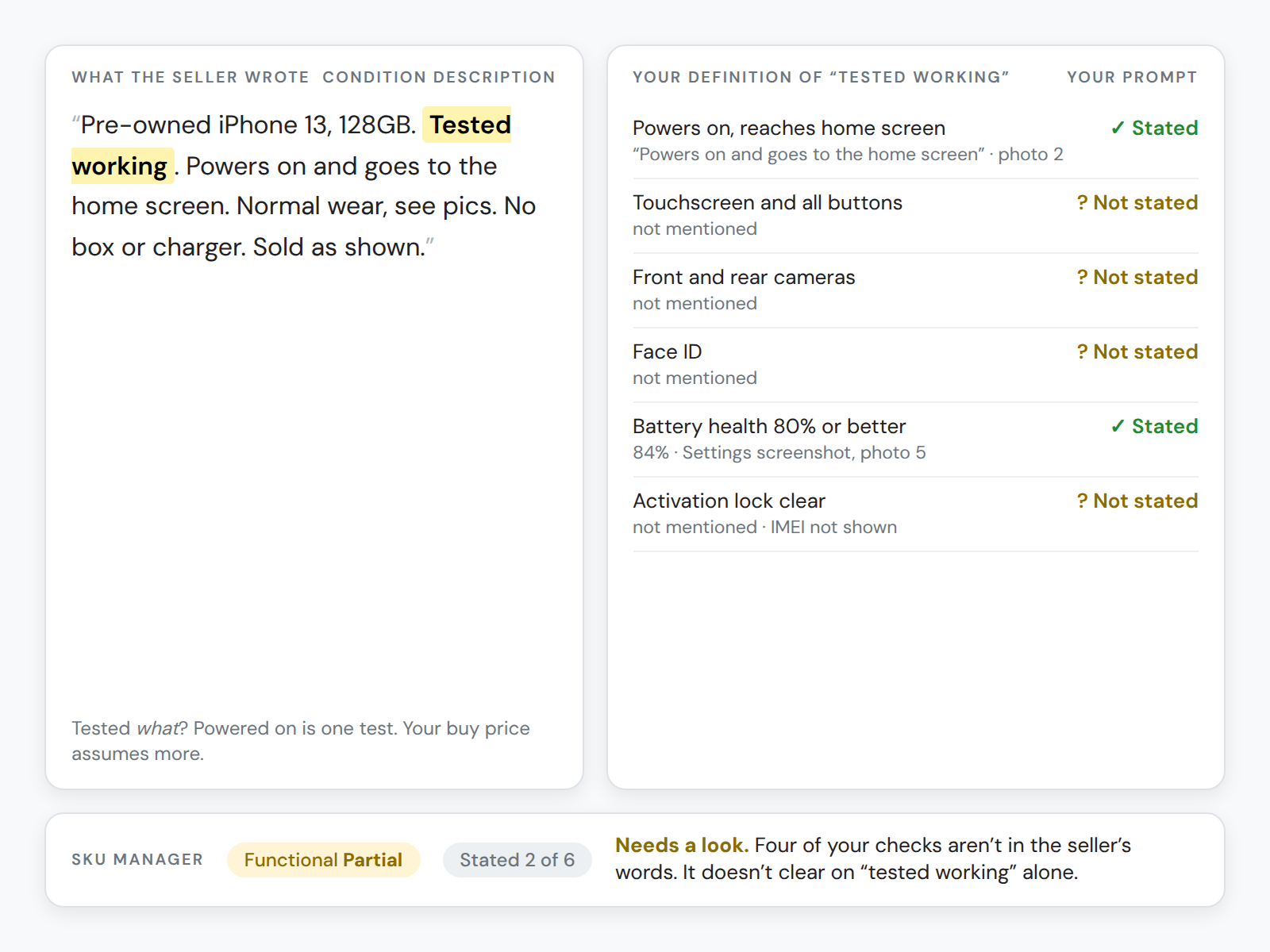
A seller's 'tested working' condition text beside the buyer's six-point definition of tested working; only two checks are stated, so it needs a look

You tell it what tested working has to mean. It holds the seller's words to that and flags the ones that don't clear it.

"The part number is in picture four."

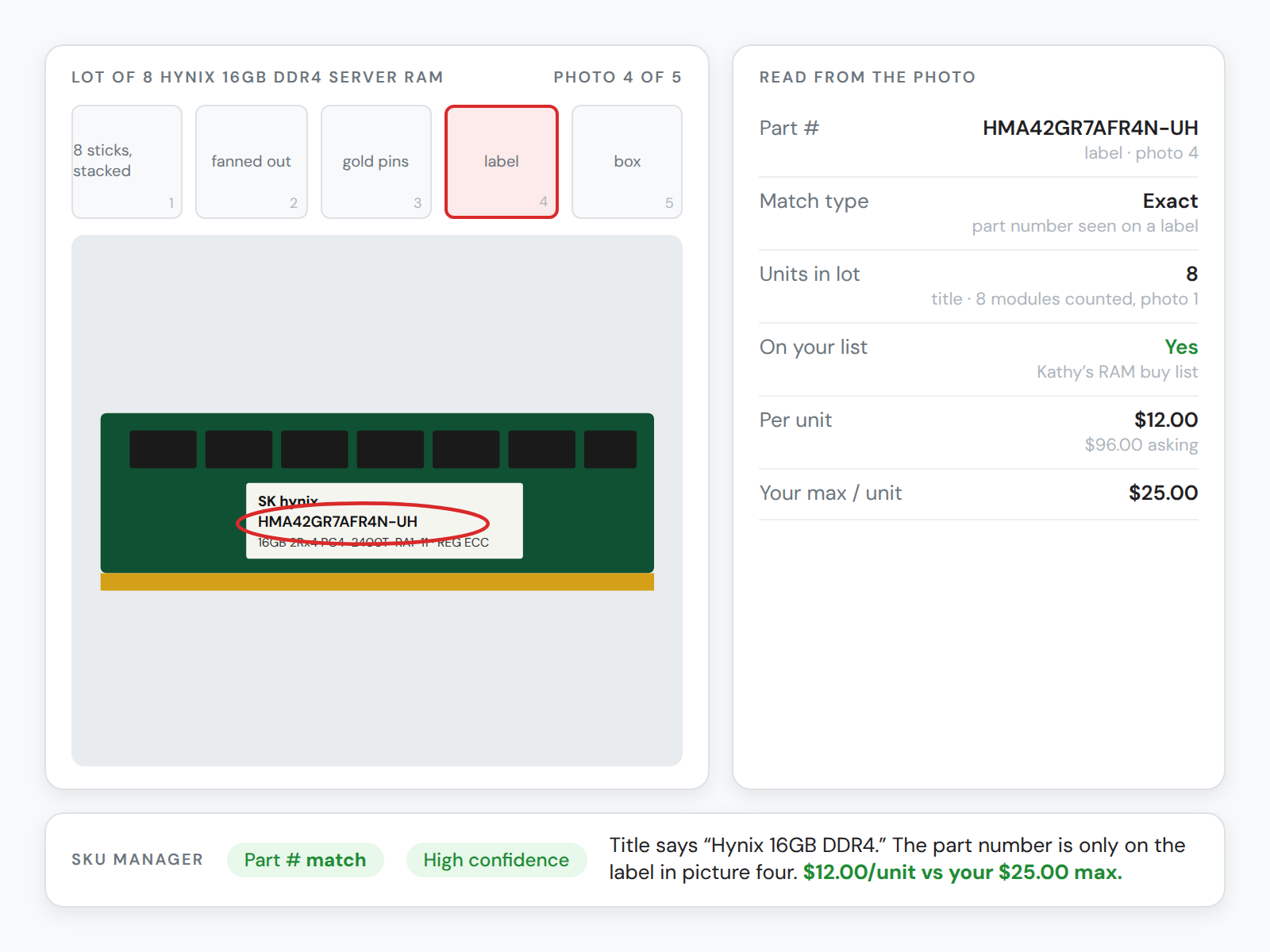
Picture four of a RAM lot with the part number on the label circled, and the fields SKU Manager read from it: part number, units, list match, per-unit price vs max

Serials, cracks, cases, extras, what's really in the lot. Often the picture is the only place it lives. It reads the pictures.

How it works

Built around your buying criteria. Run on every listing your searches bring in.

Five steps, in the order you'll actually do them.

  1. Pick your engine

    Code or AI. If the answer is a part number and a price, it's code. If it's a judgment call from words and pictures, it's AI. You can run both.

  2. Tell it which fields to send

    Title, condition, item specifics, price, the photos. Check the boxes. Nothing you didn't pick goes anywhere.

  3. Write the prompt, or point it at your script

    Your buying rules in plain language for the AI, or your Python script against your CSV. Your logic either way.

  4. Set up the display template

    Decide what the panel shows and which values become columns in your grid, so you can sort and filter on them.

  5. New listings come in. They come in analyzed.

    That's it. When a listing your search brings in matches, it runs automatically and the analyzed data is sitting next to it.

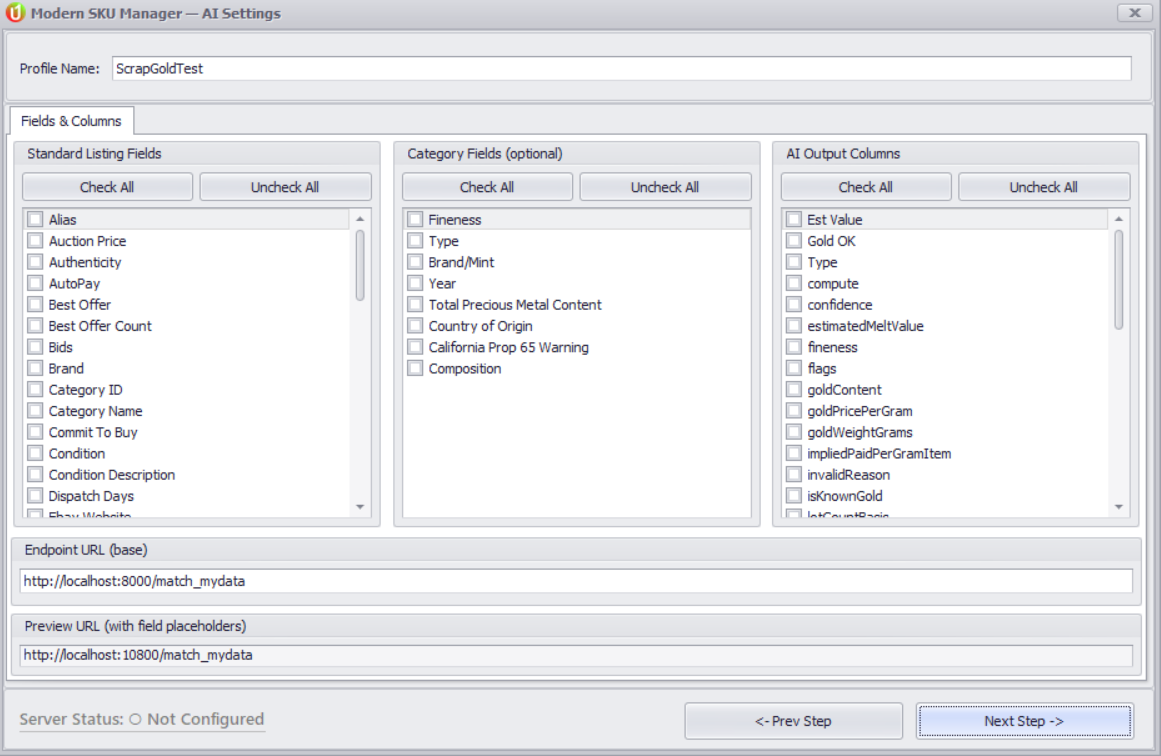
SKU Manager Fields and Columns step in uBuyFirst Desktop: checklists of standard listing fields, category fields and the AI output columns detected from the prompt
Step 2 and step 4 in one screen: the fields you send on the left, the columns it found in your prompt on the right.

Your criteria, on the next listing that comes in.Set up your first profile in uBuyFirst Desktop.

Two engines

AI for the fuzzy stuff. Code for the exact stuff.

AI Analysis is for the fuzzy areas: random descriptions, and pictures that say a thousand words. The Internal Endpoint is for what's highly part-specific and consistent: your list, your prices, the same answer every time. Plenty of buyers run both.

AI Analysis

Reads the whole listing, not just the searchable fields

  • Photos and descriptions, not just the title
  • Pulls out model, serial, dates, condition details
  • Your prompt, your output format
  • A panel beside the listing plus Yes/No or High/Low columns in the grid
  • Your own API key: Gemini, OpenAI or Claude. The provider bills you.
Internal Endpoint

Matches against your own list, on your own machine

  • Python matching against your CSV: price sheet, buy list, inventory
  • No language model, no per-call AI cost
  • Runs locally. Your sheets and margin math never leave
  • Same input, same output, every time
  • Describe your CSV and your logic, get a working script back

Or chain them

Code gates the whole stream on model and price. Only the survivors get the AI read. Pennies of compute on the stream, real judgment where it pays.

What it does

Reads. Matches. Flags. You decide.

Get it down to just the data you want, with your business decisions and calculations already run.

Reads the whole listing

Every field of the listing is available to the analysis, not just the ones eBay lets you search.

  • Title and description
  • Condition, and the condition description
  • Item specifics and category fields
  • Every photo
  • Seller information and return terms
  • Price, quantity and shipping

Matches your own data

Turns the listing into a yes or a no against what you actually know about the item.

  • Your price list, buy list or inventory file
  • A max buy price per condition and variant
  • Stock levels: do I need more of this?
  • Your margin rule, fees included, already calculated
  • Anything else you put in the prompt or the CSV

Flags what clears, and what needs a look

Clears the clear ones. Throws the handful on the edge to you.

  • Clears / doesn't clear, as a column you can sort on
  • The exceptions that need a deep dive
  • A very good deal, a big quantity, a seller you've marked
  • Your must-haves gate the result
And for the business

The expert’s rules, beside every listing your searches bring in. Whoever is in the chair.

Most arbitrage buyers are the product expert and the buyer at once. Once the criteria are written down and running, that stops being a requirement.

Delegate the purchasing

Someone who isn't the product expert can work the queue, with the expert's criteria and numbers next to every listing.

Extend hours, cover more product

Go after categories you don't know intimately and still catch the one that comes along. Run while nobody is watching the grid.

Screen the volume

Reverse it: use the rules to knock out the listings that were never going to clear, so they never reach a person.

Catch more of the edge cases

The data and the math are at hand at the moment of decision, so fewer calls go wrong for want of a number.

Once a listing is matched

Model match: yes. Now your business criteria.

The first result is whether it's an item you buy at all. Then the real questions start, and for used and gray-market stock they're the same ones every time. If you run eBay arbitrage software, you know finding the listing is the easy part. These are the things SKU Manager answers once the model matches.

  • Is it really that model?
  • What condition, really?
  • Locked, reset, working?
  • What's actually in the lot?
  • What extras, what's missing?
  • What's it worth against my list?

Multiply your knowledge, intelligence and experience. With code.

Searching and analyzing with computer assistance, beyond aggregating the data. Four places buyers are already doing it.

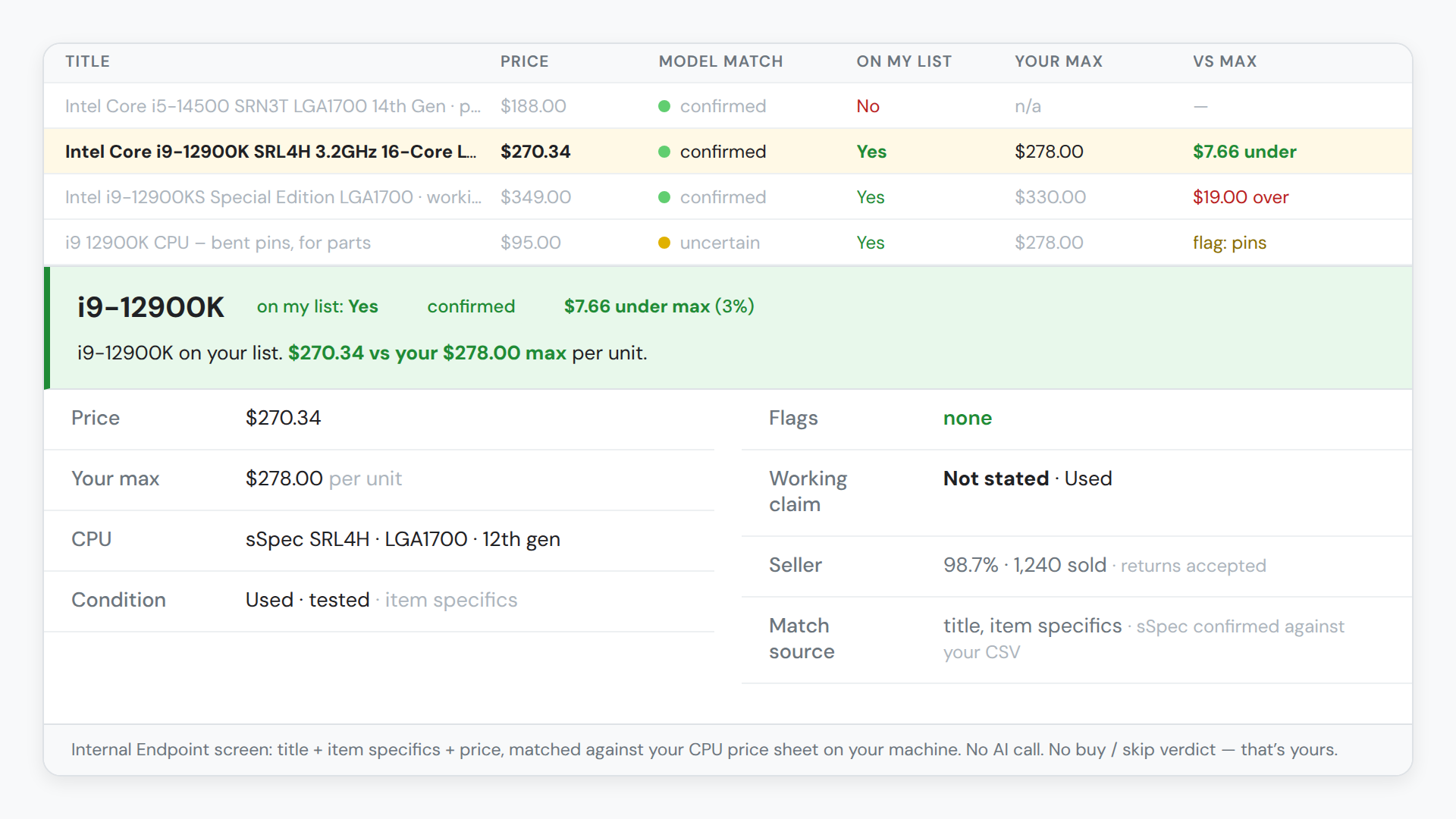
A CPU listing grid with model match, on-my-list and vs-max columns, and the Internal Endpoint panel for an i9-12900K on the list at $7.66 under max
AI Analysis

CPUs and part numbers

"I searched a model number. Half the results are something else with the same digits."

It confirms the listing is actually the model you searched for, reads the photos for bent pins or tray-versus-box, and checks the price against your list, new or used.

You decide: buy it or pass.
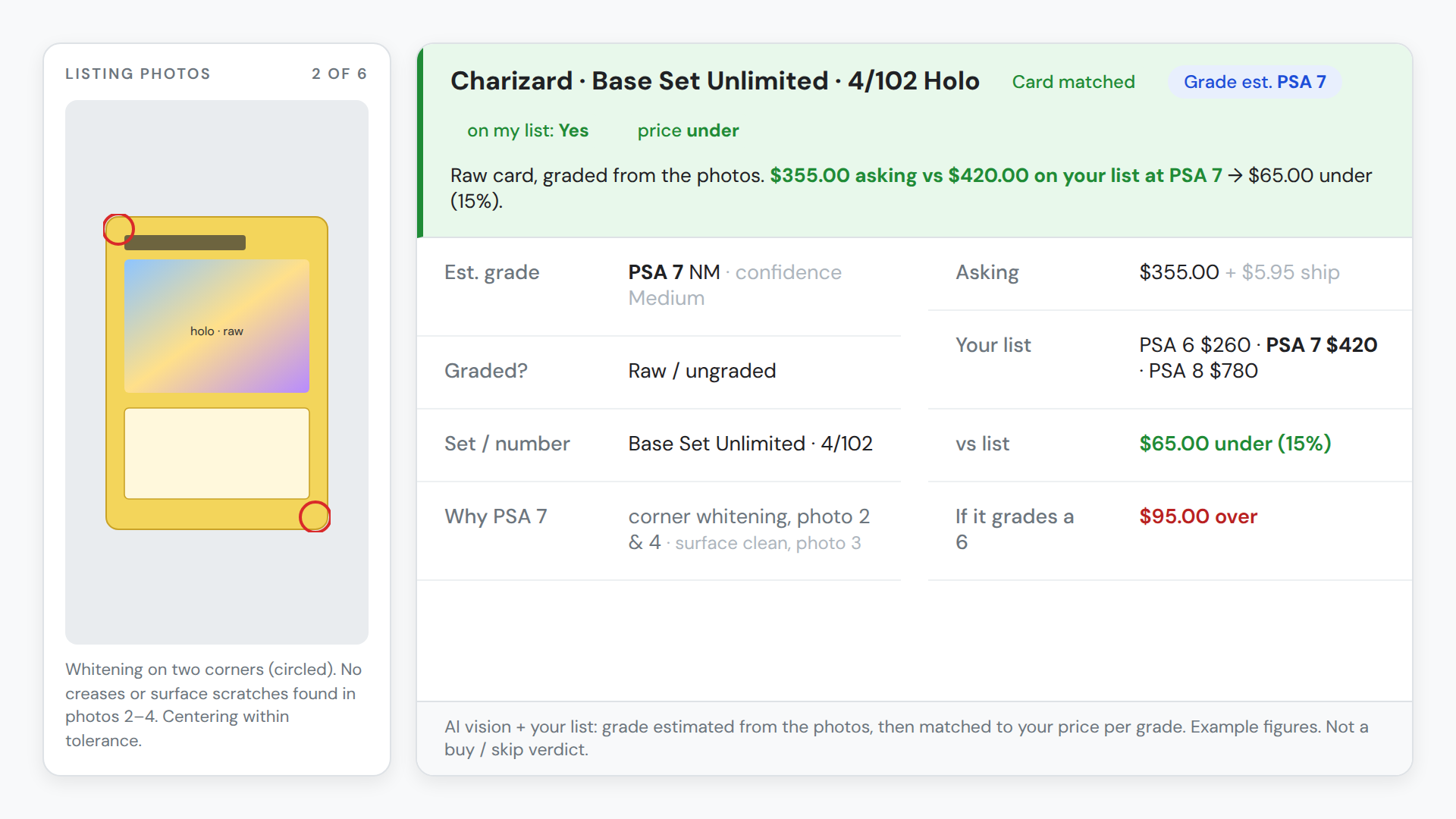
A raw trading-card listing with the PSA grade estimated from photos beside the price per grade on the buyer list
AI vision + your list

Trading cards

"A massive buy list with a price per grade. Otherwise I'm referencing some other sheet. Impossible to manage."

It reads the card and its condition from the photos, estimates the PSA grade or calls it ungraded, and matches it to your list at that grade.

You decide: is it on my list, at my price for that grade.

uBuyFirst Desktop results grid of scrap-gold lots with the SKU Manager AI analysis panel open on one lot: type, total weight, pieces, gold weight not determinable, verdict Gold OK: false
AI vision

A lot

"Often the only way to know what's in the lot is the picture."

It identifies the individual items from the images, catches the extras the seller didn't list, and notes cases, accessories and scratches. Video games or any consumer product.

You decide: what's really in it and what it's worth to me.

Shown: a real scrap-gold lot, build 6.18. A video-game lot shot replaces it when available.

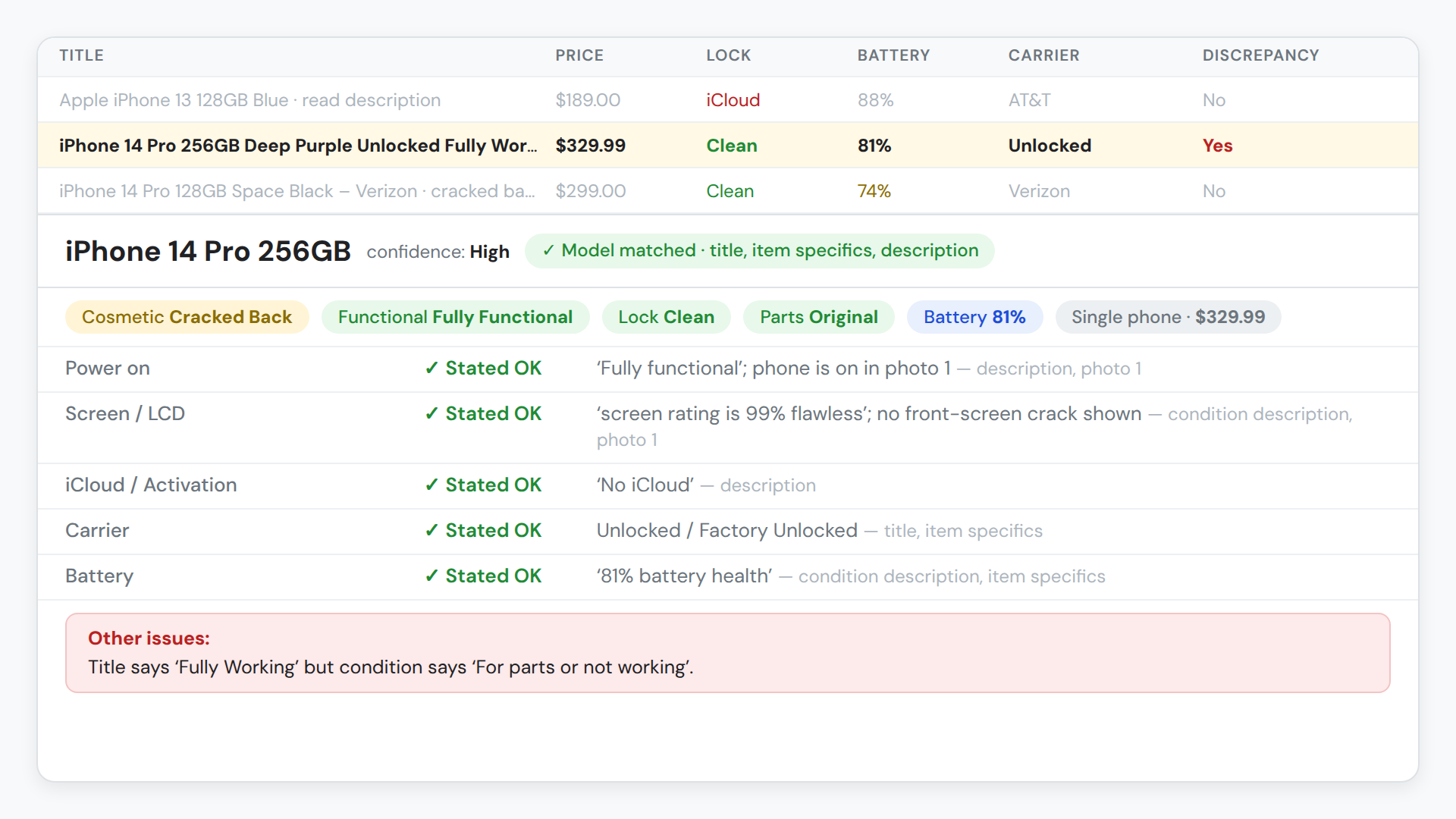
A phone listing grid with lock, battery and carrier columns and the AI analysis panel for an iPhone 14 Pro, with a title-vs-condition discrepancy flagged
AI Analysis, code pre-filter optional

Cell phones

"iCloud lock? End-user phone? Reset? Battery? Carrier? Cracks? What's in the box?"

It reads all of that from the description and the photos, confirms the model from the images, and gets it down to one number against your price structure.

You decide: buy, pass, or check on arrival.

Also in use: server RAM and PC parts against a buy CSV (the same pattern runs PC RAM arbitrage at scale), toner and industrial parts by MPN, test strips, scrap gold, watches. Larger operations with their own systems start with Custom Solutions.

Buy something that isn’t here? It runs the same way.Your category, your list, your rules.

How you get started

Don't know code? Can't write a prompt? No problem.

You bring the buying criteria. The prompt, the script and the display template get written with you, one of two ways.

Door one · do it yourself, with help

The SKU Manager Script Builder Knowledge File

A set of knowledge files: what the app knows, what it has learned, use case by use case. Load it into your AI assistant and it interviews you about what you buy, writes your prompt or your script and your display template, and can write certain things straight back into the app.

  • Asks you what you buy and what matters
  • Writes the prompt or the script, and the display template
  • Knows the app's fields, columns and setup steps
Get the Script Builder Knowledge File and the guides
Door two · let us build it with you

White-glove setup

Tell us your criteria and what's most important to you. We build the profile against your data and onboard you personally. Fill this in and we'll email you a copy, or schedule a call.

Current uBuyFirst user?
Schedule a call →

Costs nothing at this launch

Not priced as an add-on today.

Yes, you need an Enterprise license

For uBuyFirst Desktop, plus an opt-in to the SKU Manager terms.

You use your own API keys

With the AI engine, the provider bills you. The Internal Endpoint runs locally with no AI cost.

SKU Manager is in beta.

You make far fewer calls by hand. The ones you do make are the ones that matter.

eBay Compatible Application

An eBay-approved AI use case, with a person in the loop.

Microsoft EV certified

uBuyFirst Desktop is signed and verified.

Your keys, run on your side

Your API key, your machine. Nothing is trained on your data.

Questions

SKU Manager, answered

What is SKU Manager?

The analysis layer inside uBuyFirst Desktop. It reads the listings your searches bring in, title, description, item specifics and photos, against the rules you set, and gives you back the fields and the buy-or-pass signal you asked for. Two engines: AI Analysis, a language model with your prompt, and the Internal Endpoint, Python matching against your own CSV.

Does it work in the web app, uBuyAssist?

Not today. SKU Manager is a Desktop product, offered with uBuyFirst Desktop Enterprise. uBuyAssist, the web app, covers alerts, search and notifications in any browser, Mac included. Both run on the same listing feed; see the Desktop feature list for what Enterprise adds.

I don't know code and I can't write an AI prompt. Now what?

Two ways in. The Script Builder Knowledge File: load it into your AI assistant and it interviews you, then writes the prompt or script and the display template for you. Or white-glove: tell us what you buy and we build it with you. Most buyers never write a line themselves.

What does it cost, and what do I need?

SKU Manager costs nothing at this launch. You need an Enterprise license for uBuyFirst Desktop and an opt-in to the SKU Manager terms. With the AI engine you bring your own API key from Gemini, OpenAI or Claude and the provider bills you directly. The Internal Endpoint runs locally with no per-call AI cost. Chaining the two keeps the AI spend to the listings that survive your code filter.

What happens when a result looks wrong?

You flag it. A feedback trace saves exactly what was sent and what came back, images included, so the prompt or the template can be fixed and re-run. Results get better as you refine. It is in beta, and we would rather say so.

Where are the setup guides?

The SKU Manager help docs cover the quick start, prompts and templates, AI columns, the Internal Endpoint CSV setup and troubleshooting. Support and onboarding come from the uBuyFirst team directly.

Still have a question? Schedule a call →

Get started

Your rules. Your data. Your decision.

You already know what to buy and what to pay. SKU Manager puts your rules next to the listings your searches bring in and hands you the call. In beta, at no cost at this launch, with an Enterprise license for uBuyFirst Desktop.

SKU Manager is one part of the uBuyFirst suite of eBay buying software. See all products.

Hidden Deals on eBay Newsletter

Never send spam! Only quality nuggets of info!

Spot Profitable Deals Before Your Competition.

Real-time eBay deal alerts delivered to your desktop in seconds. Stop manually searching—start winning deals annually.

Lightning Fast

Milliseconds matter in deal acquisition.

Custom Filters

Only see deals that match your criteria.

Buy Direct

Purchase instantly from the dashboard.

Trusted by professional resellers moving $40M+ in eBay inventory annually.

GET 30-DAY FREE ACCESS

No Credit Card Needed — Cancel Anytime

– Download will start immediately
– License key sent to email instantly