Commit to Buy

Buy eBay listings without leaving uBuyFirst, for a 0.9% usage fee.

What it is, and why it's paid

Commit to Buy lets you buy a listing the moment it appears, straight from the app. No opening the listing in a browser, no checkout page. You commit in one click and the item is yours.

It used to be free. Our business runs on subscriptions plus small affiliate commissions, but eBay stopped paying affiliates for purchases made inside apps a few years ago, and the replacement they promised never shipped. So Commit to Buy is now a usage fee instead.

It's completely optional. You can still open any listing in your browser and buy there at no fee. For a lot of buyers, the seconds saved by staying in the app are worth it.

0.9%

of the item price, on each successful purchase made through Commit to Buy.
Example: a $100 item costs you $0.90.

How to turn it on

Desktop app

uBuyFirst

Sign up with the form below.

  1. Fill in your license email, accept the Terms, and send the form.
  2. We enable Commit to Buy on your license and confirm by email.
  3. In the app, connect your eBay account under eBay Accounts, then right-click a listing and choose Buy Now.
Web app

uBuyAssist

Sign up inside the app. No form.

  1. Open Settings and turn on Commit to Buy.
  2. Read and accept the terms. That's your opt-in; no form needed.
  3. Add a billing email and card. Stripe holds the card and checks it; nothing is charged.
  4. Pick the eBay account to buy under, and you're set.
  5. Use the Commit to Buy button on any listing card, then pay for the order on eBay under Purchases.
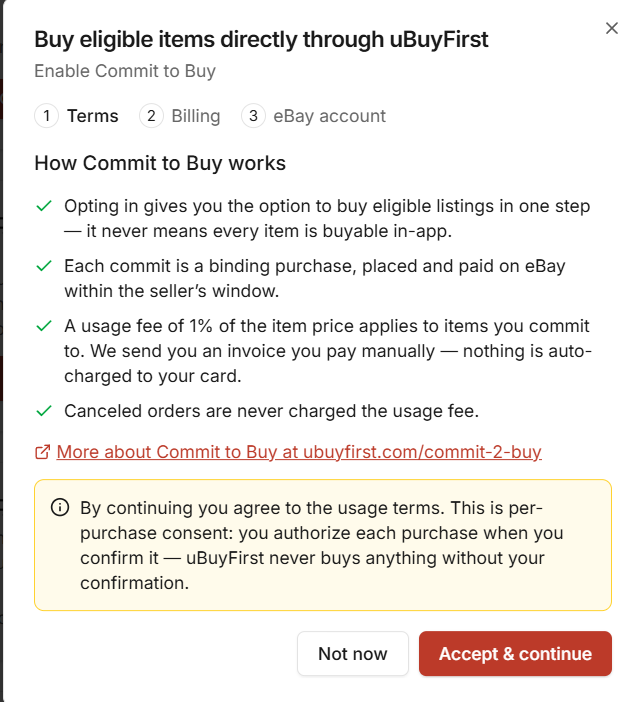
uBuyAssist enrollment dialog, Terms step: how Commit to Buy works and the 0.9% usage fee
The terms you accept when turning it on in uBuyAssist.

How billing works

  1. Opt in

    Desktop: send the form. Web app: accept the terms in Settings.

  2. Buy as normal

    Each successful Commit to Buy purchase adds 0.9% of the item price to your month.

  3. Invoice on the 5th

    On the 5th of the following month you get a Stripe invoice by email for that month's fees.

  4. Pay it yourself

    You pay the invoice manually. Nothing is auto-charged to your card. Stripe holds the card, not us.

If an invoice isn't paid, Commit to Buy is switched off on your account until it's settled.

Common questions

Is checking out in my browser still free?
Yes. The fee only applies to purchases completed inside the app through your connected eBay account. Open the listing in your browser and buy there, and there's no charge.
What about returns and cancellations?
Cancelled orders are never charged the usage fee. If one still shows up on your invoice, send us a screenshot list of the cancelled items (item number, title, price) and we'll credit them on your next invoice. The fee is 0.9% rather than 1% to allow for returns.
Can I see what I was billed for?
Yes. Ask on livechat or through the contact form and we'll send you the list of purchases behind your invoice.
How do I opt out?
Message us on livechat or through the contact form and we'll switch it off. You can opt back in at any time.

Hidden Deals on eBay Newsletter

Never send spam! Only quality nuggets of info!

Spot Profitable Deals Before Your Competition.

Real-time eBay deal alerts delivered to your desktop in seconds. Stop manually searching—start winning deals annually.

Lightning Fast

Milliseconds matter in deal acquisition.

Custom Filters

Only see deals that match your criteria.

Buy Direct

Purchase instantly from the dashboard.

Trusted by professional resellers moving $40M+ in eBay inventory annually.

GET 30-DAY FREE ACCESS

No Credit Card Needed — Cancel Anytime

– Download will start immediately
– License key sent to email instantly