
Tray Alert #
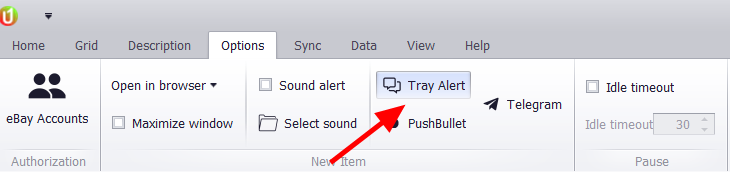
- Tray alert will give you a customized snippet of new listings in your windows desktop. No browser needed.
To see new listings away from your PC, the uBuyAssist web app offers notification channels beyond the desktop.
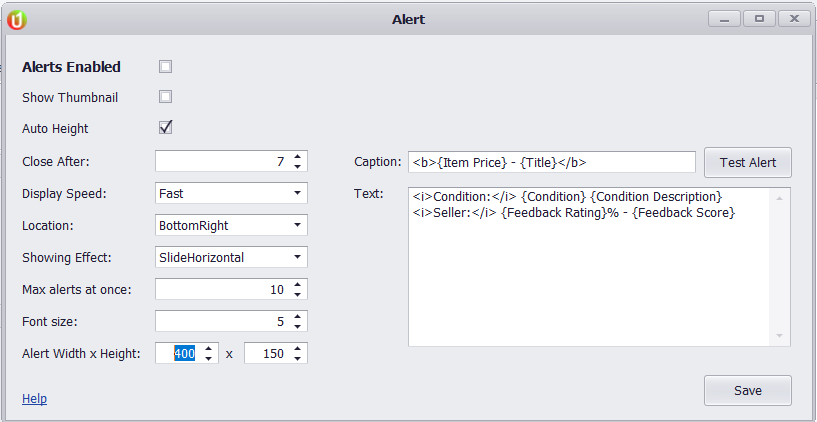
You can customize the tray alert in many ways.
- Enable/Disable alert
- Show thumbnail picture
- Auto Height to adjust height based on all information designated to show. (will not cut off information)
- Close After – Keep the notification up for “X” amount of seconds.
- Display Speed – Transition in speed of newly found items
- Location – Select location on screen to display
- Showing Effect – Transition in effect of notification
- Max Alerts – Only show a certain amount of notifications at a time in case overloaded. Won’t push off.
- Font Size – Adjust font size
- Alert W/H – Set default W/H for notification
- Caption / Text – Customize the exact information to display in a new alert using the format above and the item spec value name in the standard grids.
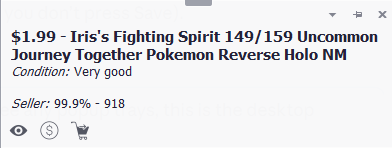
Example of notification


