
Ask Claude about your eBay orders and let it do the routine Post-Sale work (uBuyFirst Web App)
The web app Post-Sale Management API/MCP connects your Post-Sale orders to an AI assistant such as Claude.
You ask in plain words, and Claude reads and works your orders the same way you would in Post-Sale.
For example: “Which of my orders still need feedback?”, “Which order is this tracking number?” or “Add a note to my USB cable order: tested, works.”
Your searches and alerts have a connector of their own, described in Use uBuyFirst in Claude, ChatGPT and Codex.
Post-Sale also has a built-in AI assistant that changes an order only when you confirm it and needs no connector. See Post-Sale Management: AI Assistant.
Table of Contents #
- Turn It On
- Connect Claude
- What You Can Ask
- What It Cannot Do
- Before Claude Sends Anything
- Limits
- Troubleshooting
Turn It On #
1. In the web app, open Settings → Account and find What other apps can reach. #
2. Turn on Post-Sale. Claude can then read your orders. #
3. Turn on what else Claude may do. #
Change orders and setup lets it change statuses, notes, tags and archiving. In Claude, this switch doesn’t cover your Post-Sale settings: Claude can read them but can’t change them. On the API and the command line, the same switch also covers your settings. Message sellers lets it message sellers and send the automatic Item received message. Leave feedback lets it leave public feedback for the sellers you bought from.
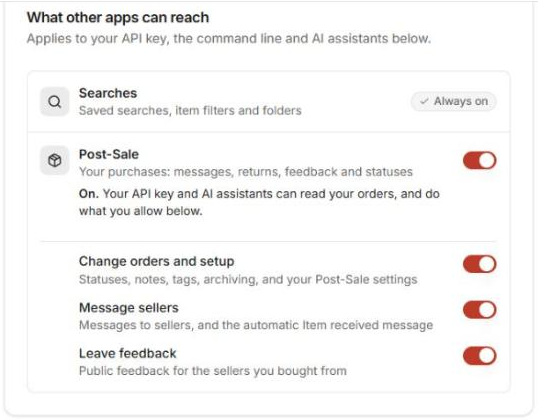
The same switches apply to your API key and the command line. Turning off Post-Sale stops every app from reaching your orders at once. This switch doesn’t affect the built-in Post-Sale AI assistant.
You need an eBay account connected to Post-Sale, as in eBay Accounts & Syncing.
Connect Claude #
1. In Claude, open Customize → Connectors, click + Add and choose Add custom connector. #

2. Give it a name such as uBuyFirst Post-Sale, paste https://app.ubuyfirst.com/psm-mcp as the MCP server URL, and click Continue. #
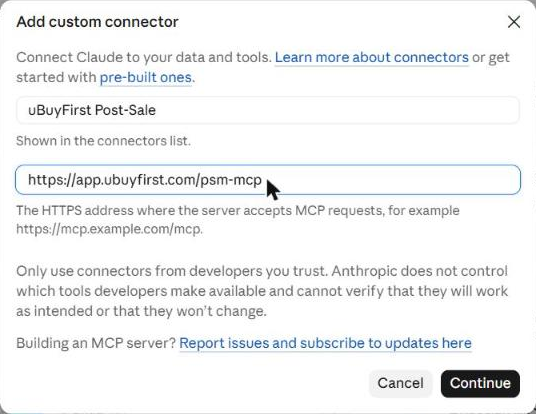
3. Sign in to uBuyFirst in the window Claude opens. #
4. Ask about your orders in any chat. #

Claude Free allows one custom connector. If you already added the main uBuyFirst connector, Post-Sale needs a paid Claude plan.
Claude Code: run this, then type /mcp, pick ubuyfirst-post-sale and sign in:
claude mcp add --transport http --scope user ubuyfirst-post-sale https://app.ubuyfirst.com/psm-mcpChatGPT, Codex and other apps: add the same address the way Use uBuyFirst in Claude, ChatGPT and Codex describes.
What You Can Ask #
Find and read #
- “Show my orders that are at risk of never arriving.” Claude finds orders by anything a Post-Sale view filters on: status, seller, title, dates, amounts, at risk, claim closing soon, or feedback can be left.
- “Open my saved view Not Received.” Claude lists your saved views and reads their orders.
- “Tell me everything about order 12-34567-89012.” Claude reads the amounts, tracking, seller, every status, tags, custom fields, notes, history and the messages with the seller.
- “Can I still leave feedback or start a return on this order?” Each order says yes or no for feedback, messaging, receiving and both kinds of return, with the reason.
- “When does my item-not-received claim window close?” Claude reads the dates Post-Sale estimates and any eBay case status.
- “How much did I spend per month this year?” Claude adds it up by month, week, seller or eBay account, per currency, with shipping, tax and refunds.
- “Who sells item 123710166134?” Claude looks up an eBay listing by its item number, if eBay still shows it.
- “Is this listing still live, and how many are left?” Claude asks eBay each time.
- “How did each of my sellers do this year?” Claude reports per seller, counted on our server.
Claude can find orders by any filter a Post-Sale view uses, and read every detail of an order.
Each order tells Claude whether feedback, messaging, receiving and returns are still allowed, and why not.
Claude can report how each seller did on your orders: orders, cancellations, spend per currency, orders shipped late, orders that haven’t arrived and are past their delivery estimate, not-received cases, returns, refunds and the average days from payment to shipment. An order past its estimate may still arrive.
Claude can check whether an eBay listing is still live and, when eBay says, how many are left. It asks eBay each time. If eBay no longer shows the listing, as it often doesn’t for an item you bought, Claude says it may have ended. For a listing with variations the number left is unknown, and it can read as live even when every variation is sold out.
Receiving #
- “Which order is this tracking number?” A full label barcode works too, such as a USPS barcode with 420 and the ZIP code in front.
- “Mark order 12-34567-89012 received, all checks OK, Condition on arrival: As described.” Claude fills in the four inspection checks and your own receiving fields, or reports an issue.
Claude can find an order by its tracking number or label barcode and mark it received with your receiving fields.
Organise #
- “Set Triage to Tested complete on my HP order.”
- “Tag it Needs review.”
- “Set Cable type to USB-C.”
- “Archive my finished July orders.”
- “Add a note: tested, works.” Claude can also edit and delete notes.
Every change Claude makes shows in the order’s History as made through MCP, with your email.
Messages and feedback #
- “Message the seller of my USB cable order and ask when it ships.”
- “Leave positive feedback on every order that arrived this week, and thank the seller.”
- “Reply to the feedback the seller left me.”
These go to eBay. See Before Claude Sends Anything below.
What It Cannot Do #
Claude cannot buy, bid, pay, refund, or open a return or an item-not-received claim. For those, Post-Sale links to your eBay Purchase History.
Claude cannot create custom fields, receiving fields, tags, statuses or saved views. Make them in Post-Sale, and Claude can then use them.
Claude cannot change the statuses eBay sets: eBay order, Payment and Shipping. The next sync updates them.
Claude cannot upload photos to an order. It can list an order’s photos and delete one.
Claude can read your Post-Sale settings but cannot change them. Change them in Post-Sale under Settings, for example Shipping & INR.
Claude cannot open, answer or close an eBay dispute (an item-not-received request or a not-as-described return); do that on eBay. It can read one: each order says whether eBay reports a dispute for an item not received or not as described, who has to act next (you, the seller or eBay) or that it is closed, and, when eBay gives them, when it was opened and its last activity. If Post-Sale can’t tell where a dispute stands, check it on eBay. A return for a change of mind is not a dispute.
Claude can also find orders by dispute and dispute status, for example “Which of my disputes are waiting for me?”. Your own Dispute status in Post-Sale (None, Evaluating, Needs dispute and so on) is separate from what eBay reports. eBay never changes it, and Claude can set it like your other statuses.
Before Claude Sends Anything #
A message, feedback or a reply to feedback goes to eBay from your own eBay account, as if you had sent it in Post-Sale.
Feedback and replies are public, and eBay does not let you change a reply.
Marking an order received sends the seller your Item received message, if you set one up, unless Message sellers is off. You can also ask Claude not to send it.
In Claude’s Manual permission mode, Claude asks before it uses a tool, even one that only reads, unless you chose Always allow for that tool. In Manual mode, Claude also asks before every change to an order, such as setting a status, adding a note or a tag, setting a custom field, archiving it or marking it received, unless you chose Always allow for that tool. Click Allow once, Always allow or Decline.

To choose per tool for Manual mode, open the connector in Customize → Connectors. Its read-only tools and its write and delete tools each have their own setting.
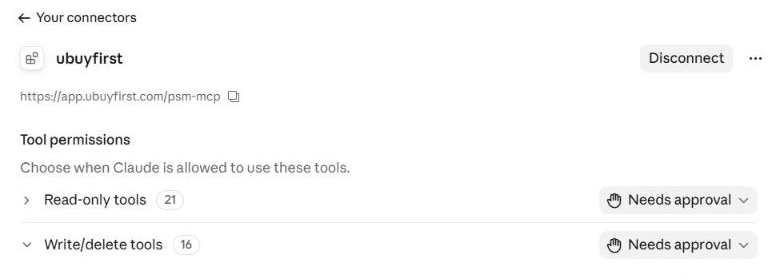
In Auto mode, Claude may use a tool without asking, even one set to Needs approval. An automated check blocks the actions it flags as risky, and Claude pauses to ask if anything looks unsafe. To be asked before tools you have not allowed, set the mode button under the chat box, next to the model name, to Manual.
Limits #
Messages can go to a seller up to 90 days after the purchase, 1 to 2000 characters each. eBay refuses email addresses and links in a message.
Feedback can be left up to 60 days after the purchase, 1 to 80 characters each. Claude leaves feedback in one batch at a time, up to 100 orders.
Messages and feedback take the merge tags {order} {item} {seller} {amount} {tracking}.
Message threads and listing look-ups share 60 eBay reads an hour.
A sync now runs once every 15 minutes per eBay account.
Troubleshooting #
“Post-Sale is switched off for other apps on this account.” Turn on the Post-Sale switch, as in Turn It On above.
“Message sellers” (or “Leave feedback”, or “Change orders and setup”) “is switched off for other apps on this account.” Turn on that switch in the same place.
“No uBuyFirst account is linked to this login yet.” Sign in once at app.ubuyfirst.com with the same login, then try again.
“That status is set from eBay … and cannot be changed by hand.” eBay order, Payment and Shipping come from eBay, and the next sync updates them.
“That action is not available for this order right now” with a reason such as already_received or feedback_already_left. Ask Claude to read the order to see where it stands.
Still stuck? Contact us at ubuyfirst.com/support.


