
New here? Start with the eBay Item Tracker overview — what it records, what it costs, and how it compares with eBay’s watch list. This page is the step-by-step guide.
Already have eBay item numbers? Paste them in and Item Tracker watches them for you.
Item Tracker (the Track tab in the web app) monitors eBay listings you already know by item number and keeps their price, quantity, and availability up to date. Free while in beta.
Table of Contents #
- What Item Tracker Does
- Add Your Items
- The Tracked-Items Grid
- Turn On Tracked-Item Alerts
- Filter, Sort, and Customize
- FAQ
What Item Tracker Does #
You already have item numbers — from past purchases, sellers you follow, or your own research. Paste them in, upload them, and track them. Item Tracker keeps every listing current: price, price changes, quantity, and whether it’s still active, ending soon, out of stock, sold, or ended.
- Updates every 5–10+ minutes.
- Tracks up to 10,000 items — eBay’s own watch list caps out at 500. Need more than 10,000? Contact us.
- Free while in beta.
Add Your Items #
Open Track and click + Add items (top right).
- Paste your eBay item IDs into the box, one per line — up to 10,000 at once. The dialog counts how many are ready as you paste.
- Click Track items.

First Status Takes a While.
New items can take 10–60 minutes to show their first status. That’s normal — no need to re-add them.
The Tracked-Items Grid #
Added items appear in the grid with columns for Price, Price change, Status, Qty, Sold, Started, Ends/ended, Last checked, and Change detected.
The status tabs across the top filter with one click — All · Active · Ending soon · Price drops · Out of stock · Sold · Ended — each with a live count. There’s also a search box, a trash icon on each row to remove one item, and Clear all to empty the list.

Turn On Tracked-Item Alerts #
The Tracked-item alerts panel sits above the grid. When a tracked item changes, it can message you — set it up once:
- Flip the toggle from Paused to On.
- Pick at least one trigger under Alert me when an item is…: Price drop · Back in stock · Out of stock · Sold · Ended.
- Choose where alerts go under Send to: Email, WhatsApp, or + Connect a channel.
- Click Save changes.

Alerts Start Paused.
Until the toggle is On and at least one trigger is picked, you won’t be notified of any changes.
Filter, Sort, and Customize #
Two ways to narrow the grid down:
- Filters panel — the Filters tab on the right edge of the grid opens a side panel with a filter for every field (Item, Price, Price change, Status, Qty, Sold, Started, Ends/ended, Last checked, Change detected, Changes).
- Column filters — each column also filters by condition: Contains, Does not contain, Equals, Does not equal, Begins with, Ends with, Blank, Not blank. Filters apply across your whole tracked list.

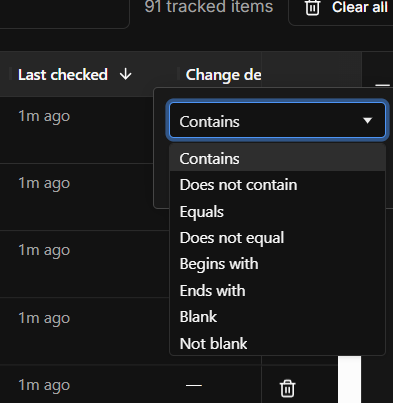
Columns sort and rearrange by dragging, and Customize lets you hide fields you don’t need.
FAQ #
How often does it update?
Every 5–10+ minutes.
How many items can I track?
Up to 10,000 — far past eBay’s 500-item watch list. Contact us if you need more.
Why doesn’t my new item show a status yet?
The first status can take 10–60 minutes to appear after adding an item.


